Tech Notes

AVEVA Unified Engineering – MSIX clean Installation/Uninstallation| Tips

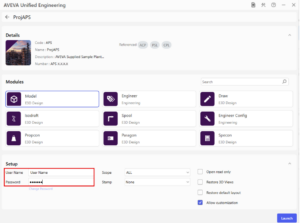
To ensure a clean, conflict‑free installation of AVEVA Unified Engineering, remove any previously installed MSIX packages before deploying the required version. Step 1 – Check for existing installed packages Open Windows PowerShell and run the following command: This lists all AVEVA Unified Engineering MSIX packages currently present on the machine. Step 2 – Remove existing packages If

Tech Notes

AVEVA E3D DESIGN –   ISODRAFT – Using AXES command to specify alternative coordinate system instead of the WORLD | Expert Guide

When the coordinates and/or the orientation of the 3D model elements do not align with the World coordinate system and/or cardinal axes and the required positional coordinates displayed on Piping isometrics need to be referenced from an alternate element other than the WORLD /*. Resolution Using the AXES command in ISODRAFT will help resolve this issue. By

Tech Notes

AVEVA UNIFIED ENGINEERING 4.0 –  Industrial AI Assistant| NEW FEATURE

The Industrial AI Assistant (IAIA) is a conversational digital assistant designed to help users access relevant model information through natural, intuitive dialogue.Powered by advanced large language models from OpenAI and hosted on Microsoft Azure, the IAIA interprets natural language requests and returns meaningful, context‑aware information.Users no longer need to know specific AVEVA Unified Engineering command

Tech Notes

AVEVA UNIFIED ENGINEERING 4.0.1| Known Issues &Fixes

List of Fault Corrections This release resolves defects identified through the following support incidents Module / Application Description Model Title: Request for Support Regarding E3D Savework Hang Issue inSpectrum EnvironmentResolution: Fixed – A problem occurred when checking the status of the spatial map during savework, which led to empty DESI databases with no mappable elements

Tech Notes

AVEVA ADMINISTRATION 3.1.1 | What’s New

List of Fault Corrections This release resolves defects identified through the following support incidents Product / Module Description Administration3.1.1 Unable to move/delete Template items in E3D 3.1.10 Able to move/delete the same Template items in E3D 3.1.5 Important changes UPDATE access mode databases: This release resolves an issue related to claiming TMPL elements within extracts.

Tech Notes

AVEVA E3D DESIGN 3.1.11| Known Issues &Fixes

List of Fault Corrections This release resolves defects identified through the following support incidents Module / Application Description Cable Title: Incorrect Cable Layout Position when auto routing cablesResolution: Fixed. The offset inside CWBRAN will not be maintained when there is enough space between CWBRAN to bend the cable. If the distance is larger than 4

Tech Notes

AVEVA E3D DESIGN –   Internal volume of pipes Calculation | Expert Guide

At the moment, there is no dedicated tool or attribute that directly provides the internal volume of a pipe. However, a pseudo‑attribute can be used to approximate it: BRWWEI. This pseudo‑attribute returns the wet weight of the pipe (or branch or individual component, depending on the current CE), meaning the weight including the fluid. The

Tech Notes

AVEVA E3D PARAGON –  Bolt Weights with Old Calculation Method | Expert Guide

In earlier versions, the Old Bolt Calculation Method did not include support for bolt weights. The attributes BLTWEIGHT and BWEIGHT were introduced later to provide this functionality. An example from the legacy Aveva PDMS documentation is shown below: Resolution Bolt Weights can be set using BLTWEIGHT attribute at SBOL element and BWEIGHT attribute at DTAB

Tech Notes

Prerequisite for AVEVA Unified Engineering 4.0

Workstation Configuration For effective use of AVEVA Unified Engineering 4.0 the configuration listed below is recommended. Configuration Recommendation Operating System(s)*1 • Windows® 11 23H2 (64-bit) (version 22631.4460 or higher)• Windows® 11 24H2 (64-bit) (version 26100.7019 or higher) Processor Type / Speed Intel x64 compatible – CPU with high performance in each processor core. Memory 32

Tech Notes

AVEVA E3D DESIGN –  Pipe Stress Interface R2 (PSI-R2) | Tips

What is the goal of this additional PSI interface? This interface is to create this two-way exchange from AVEVA E3D Design and the Rohr2 (https://www.rohr2.com/en/rohr2.html), the European Software for Pipe Stress Analysis The configuration on the E3D side : To use the interface, additional User Defined Attributes (UDAs) and catalog data are required. The UDA

Scroll to Top