
The Pipe Stress Interface has been enhanced to let users adjust and export the ambient temperature used in the stress analysis.
The ambient temperature can be modified in the receiving application, and when the data is imported back into the Pipe Stress Interface, any changes are detected. If the ambient temperature has been updated, the user is prompted to apply the new value in the Pipe Stress Interface Settings form.
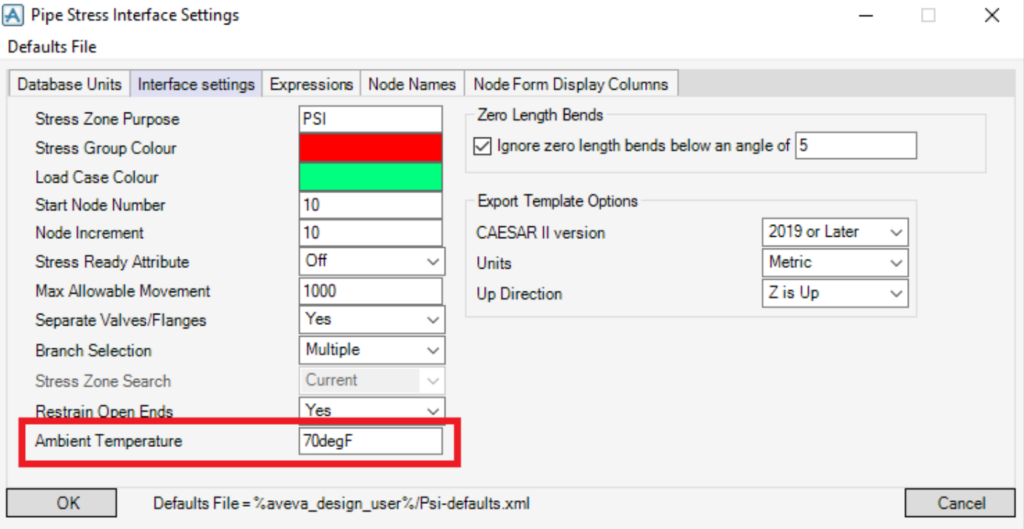
The ambient temperature is defined using the temperature units of the E3D Design session. During export, this value is converted to the units specified in the Export Temperature Options before being imported into the receiving application.
If the ambient temperature has been modified and then re‑imported into the Pipe Stress Interface, a notification will appear during import to inform the user of the change.
The user is prompted to confirm whether they want to update the default ambient temperature in the Pipe Stress Interface settings. Selecting Yes saves the new ambient temperature to the defaults file, while selecting No discards the change and leaves the existing default value unchanged.
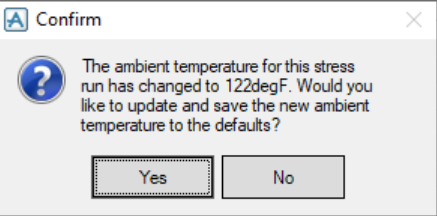
The new ambient temperature will be converted from the units specified in the CII file to the temperature units used in the current E3D Design session.