List of Fault Corrections
This release resolves defects identified through the following support incidents
| Case number | IMS / Bug number | Product / Module | Description |
|---|---|---|---|
| 960425599 | 3335550 / 3354305 | Administration 2.1.1.0 | Wrong grid sorting in admin elements form in Administration 2.1.1, for numerical and date sorting. |
| 960391182 | 3306780 / 3080478 | Administration 2.1.1.0 | User description being lost in AD user creation. |
| 960422079 | 3342262 / 3342371 | Administration 2.1.0.1 | DAC switching on/off not working properly in Admin 2.1 after upgrade from 1.9. |
| 960430244 | 3384176 / 3399066 | Administration 2.1.0.1 | KEYCOPY mirror on UDAs causes Fatal Error. |
| 960408920 | 3286019 / 3287556 | Administration 2.1.0.1 | KEYCOPY UDAs – Fatal error if original UDA has been deleted. |
| 960278401 | 2410086 / 2938052 | Administration 1.9.7.0 | RAM DISK – “Windows cannot verify the digital signature” error. |
Important changes
Data Integrity Checker with Patch for Spectrum Projects :
Data Integrity Checker (DICE) now includes a new capability to perform checks and/or apply patches to databases within a Spectrum project.
UPDATE access mode databases:
Support for UPDATE-access databases is being withdrawn across all AVEVA products. All product modules now support multi-write databases, and with this release, AVEVA requires that all UPDATE databases be converted to MULTIWRITE.
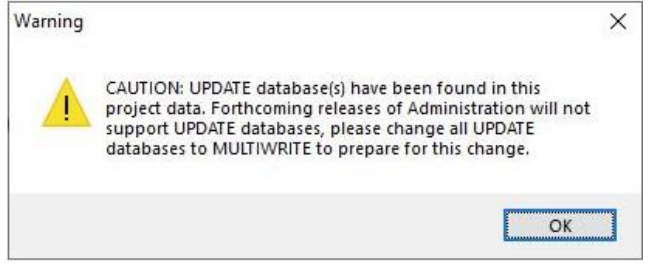
While UPDATE databases are still temporarily permitted, administrators will receive a persistent notification each time they log in to the Administration module, prompting them to remove UPDATE-mode databases from their projects. The notification will appear as shown below.
In upcoming releases, the presence of UPDATE databases within a project may result in restricted access to all modules except Administration. In such cases, UPDATE databases must be converted to MULTIWRITE in order to restore full project access.
The syntax to change database access is as follows:
CHANGE ACCESS MULTIWRITE
Ultimately, all databases will be required to operate in MULTIWRITE mode. Additionally, the Export utility in AVEVA Administration will automatically convert any project UPDATE database to MULTIWRITE (Implicit).
Similarly, the Import utility will also convert UPDATE databases to MULTIWRITE (Implicit). Customers using spreadsheets generated from earlier exports for new project creation should be aware of this behavior.
Foreign UPDATE access databases
In cases where foreign reference databases have an UPDATE mode these need to be changed to MULTIWRITE in the source project and then the definition of the reference database redefined in the project which was using it as foreign.
If foreign DBs that have changed mode it will affect PDMS 12.1.sp4 and sp5 and E3D 1.1 and 2.1, forcing the user session to Monitor.
In these cases, the definition of the foreign database must be reset in Admin using the command CHANGE FOREIGN RESET Project administrators will need to issue the CHANGE FOREIGN RESET command for all appropriate projects running under the stated product versions. E3D 3.1 and beyond ignore these changes of mode and users enter their chosen module as normal.
As part of the transition, AVEVA has changed all UPDATE DBs in its sample projects to MULTIWRITE and the project 3.6.1.0 release and beyond reflect these changes. There is now need for customers to make or plan changes, the presence of update databases in a project at this release will result in a persistent reminder/warning message in admin. AVEVA strongly recommend that customers change all UPDATE databases to MULTIWRITE mode for the following reasons:
(1) AVEVA will remove all code management of UPDATE DBs within its Dabacon product range by the end 2023 and they will no longer be supported and projects that use UPDATE database will not be openable in any module apart from Administration where customers will be able to change them and regain full access.
(2) None of the AVEVA Dabacon cloud-based products support UPDATE mode for DBs owned by any project provisioned in the AVEVA cloud environment.
CADC_LANG
AVEVA PDMS, Hull & Outfitting and AVEVA E3D products all support the use of Unicode characters.
With the release of AVEVA E3D Design 4.0 support for CADC_LANG will be withdrawn for all AVEVA products.
New methodology for building PML libraries
In this release and across all products PML indices are scanned and built dynamically each time a user enters an AVEVA application from the paths defined in the environment and subfolders there in.
This means that pml.index files which were used as a quick reference in previous versions are no longer used or necessary.
Each user session will build its own index from scratch on entry.
Normal syntax for updating PML file changesin-session PML REHASH ALL will still be supported and but will rebuild the memory retained definition of PML, not the pml.index which no longer exists. As PML can be updated in files and the index rebuilt in-session as before.
It is also worth noting that the “version.dat” file has also been removed.
This approach to building the PML library is beneficial for cloud-based implementations and facilitates the adoption of Microsoft install technology MSIX.
Active Directory Users
The form that deals with Active directory users has been revised in this version of Administration it allows two identities to be held for a single windows user.
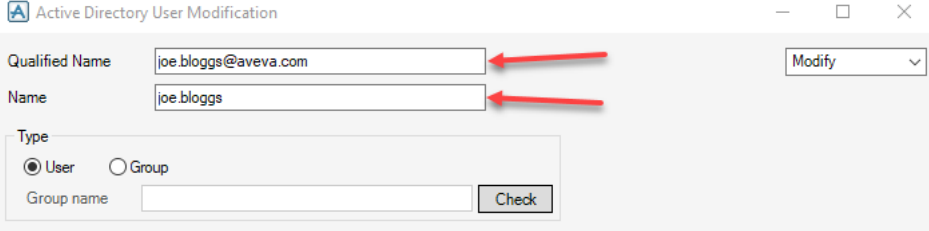
The qualified name is the new way of evaluating a user identity and allows the “@” character. This qualified name is the method used by AVEVA Connect, and the latest versions of our products to identify users.
The older way of dealing with active directory is the name here is simply the windows username. This is still in use by older versions of our products. It is possible that if the customer is using older versions of one product with newer versions of others that both these fields should be filled as shown in the picture above.
In further developments this email address will be used to compile email lists directly from Administration dynamically, meaning if an administrator wanted to email a group of users, or maybe all people currently logged into the project there will be additional development to collect the qualified names ready for email.
As a result of all this, it is advisable to fill out both fields on this form, if possible, this will then meet all the requirements from legacy product and future product.
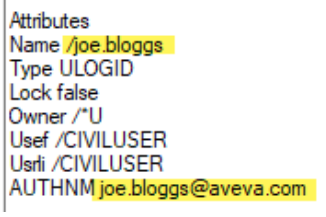
In terms of attributes this means that the ULOGID element has the following values.