
List of Fault Corrections
This release resolves defects identified through the following support incidents
| Product / Module | Description |
|---|---|
| Administration 3.1.0 | DBSets modification in projects with thousands of DBs takes a long time to populate |
| Administration 3.1.0 | Performance issue with exiting the Administration Module |
| Administration 3.1.0 | Fatal Error — Using Binding Configuration form at Satellite |
| Administration 3.1.0 | Incorrect sort by date in Expunge User Process form |
| Administration 3.1.0 | Sorting by DB‑Number on grids |
| Administration 3.1.0 | Fatal Error using Binding Configuration form at satellite location |
| Administration 3.1.0 | Old deleted AD users block creation of new AD users with the same name |
Important changes
UPDATE access mode databases:
Support for UPDATE-access databases is being withdrawn across all AVEVA products. All product modules now support multi-write databases, and with this release, AVEVA requires that all UPDATE databases be converted to MULTIWRITE.
While UPDATE databases are still temporarily permitted, administrators will receive a persistent notification each time they log in to the Administration module, prompting them to remove UPDATE-mode databases from their projects. The notification will appear as shown below.
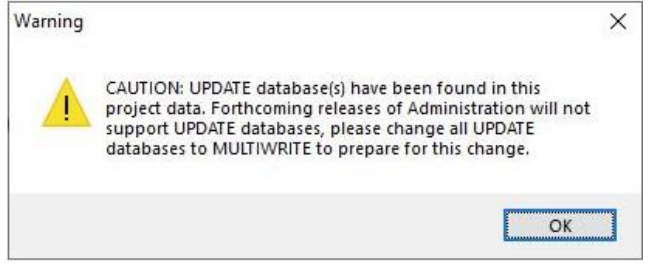
In upcoming releases, the presence of UPDATE databases within a project may result in restricted access to all modules except Administration. In such cases, UPDATE databases must be converted to MULTIWRITE in order to restore full project access.
The syntax to change database access is as follows:
CHANGE ACCESS MULTIWRITE
Ultimately, all databases will be required to operate in MULTIWRITE mode. Additionally, the Export utility in AVEVA Administration will automatically convert any project UPDATE database to MULTIWRITE (Implicit).
Similarly, the Import utility will also convert UPDATE databases to MULTIWRITE (Implicit). Customers using spreadsheets generated from earlier exports for new project creation should be aware of this behavior.
Foreign UPDATE access databases
In cases where foreign reference databases have an UPDATE mode these need to be changed to MULTIWRITE in the source project and then the definition of the reference database redefined in the project which was using it as foreign.
If foreign DBs that have changed mode it will affect PDMS 12.1.sp4 and sp5 and E3D 1.1 and 2.1, forcing the user session to Monitor.
In these cases, the definition of the foreign database must be reset in Admin using the command CHANGE FOREIGN RESET Project administrators will need to issue the CHANGE FOREIGN RESET command for all appropriate projects running under the stated product versions. E3D 3.1 and beyond ignore these changes of mode and users enter their chosen module as normal.
As part of the transition, AVEVA has changed all UPDATE DBs in its sample projects to MULTIWRITE and the project 3.6.1.0 release and beyond reflect these changes. There is now need for customers to make or plan changes, the presence of update databases in a project at this release will result in a persistent reminder/warning message in admin. AVEVA strongly recommend that customers change all UPDATE databases to MULTIWRITE mode for the following reasons:
(1) AVEVA will remove all code management of UPDATE DBs within its Dabacon product range by the end 2023 and they will no longer be supported and projects that use UPDATE database will not be openable in any module apart from Administration where customers will be able to change them and regain full access.
(2) None of the AVEVA Dabacon cloud-based products support UPDATE mode for DBs owned by any project provisioned in the AVEVA cloud environment.
CADC_LANG
AVEVA PDMS, Hull & Outfitting and AVEVA E3D products all support the use of Unicode characters.
With the release of AVEVA E3D Design 4.0 support for CADC_LANG will be withdrawn for all AVEVA products.
New methodology for building PML libraries
PML indices are now scanned and generated dynamically at every application launch, across all products. Instead of relying on the old pml.index files as quick‑reference caches, each user session reconstructs its own index from the PML files found in the environment‑defined paths and their subfolders. The legacy index files are therefore no longer used or required.
The usual in‑session command PML REHASH ALL remains available, but it now refreshes only the in‑memory PML definitions rather than updating any pml.index file, since that file no longer exists. PML updates made directly in the source files can still be picked up during the session as before.
The version.dat file has also been removed. This new dynamic approach to building the PML library is particularly well suited to cloud deployments and supports the transition to Microsoft’s MSIX installation technology.
MSIX Install
AVEVA is transitioning its products to Microsoft’s MSIX installation technology, which will progressively become the standard across the entire AVEVA suite. From version Administration 3.0.0.0 onward, the Administration module is delivered exclusively through MSIX. This shift introduces several operational changes detailed in the Getting Started Guide. It affects how unattended batch processes are executed, how licensing behaves, and how customisation and deployment are handled for both silent and interactive installations and removals. AVEVA has also produced a guide explaining MSIX and the new Unified Engineering login form, and the same guidance applies directly to Administration.
(Refer to this link
https://docs.aveva.com/bundle/engineering-ue-getstarted/page/1440247.html)
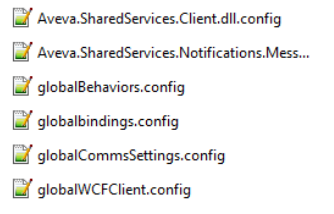
The configuration files that control how Administration communicates with Global and Shared services have also been moved. They were previously stored inside the installation directory, which would no longer be accessible under MSIX. These files have now been relocated to a new, appropriate location.
%localappdata%/AVEVA/AVEVA Administration/ClientConfigurationFiles
Spectrum projects support for SAMEREF reconfigure
This version of Administration introduces some support for SAMEREF reconfiguration within Spectrum.
For reconfiguration to take place in a Spectrum project, the project needs to be locked and all user sessions closed. Spectrum projects can only be locked and expunged in the Spectrum Dashboard (not in Administration).
Backtrack of databases is not supported in Spectrum yet, as a result reconfigure sameref is restricted to the delete and create database file method only presently.
The option to reconfigure with sessions and without sessions is supported. However, reconfigure SAMEREF of the system database (repair) is not supported and nor is reconfigure of extract databases yet. General reconfigure (non-sameref) from one database to another remains unsupported in Spectrum currently, for example commands like RCFUPDATE are not currently supported at this release
Spectrum projects support for extract database support
In this version of Administration regular extract databases are supported, but variant extracts and working extracts are not.
Spectrum projects support for REVERT command
In this version of Administration the REVERT command is supported, databases held in Spectrum can be reverted.
Change of behavior for the form that defines Active Directory (AD) users
Historically, and for older versions of our products, AD users were identified and controlled by the Name attribute of ULOGID elements. In more recent versions of Administration, the products are migrating to using the Authnm attribute on the ULOGID. Authnm offers more flexibility in terms of special characters in the AD identity including the @ symbol, which is necessary for capturing LaaS identity (typically an email address).
The user interface has been updated accordingly.
Old Active Directory User Creation form- Authnm and name defined separately.

New Active Directory User Creation form- Authnm and name defined together.

If the value for name contains an @ symbol this is taken as a flag that the name being provided is a LaaS identity and the whole string from name field is populated to the Authnm attribute of the ULOGID.
If the name does not contain an @ then this is taken as indication that the name is a windows user or AVEVA Licensing Service identity and is updated to both the Name and the Authnm attributes.
New methods for making projects
The old method of making project involved the use of makemac.mac, now this mac is
encapsulated in the MSIX install and will be retired. It is replaced by two new methods of making new projects.
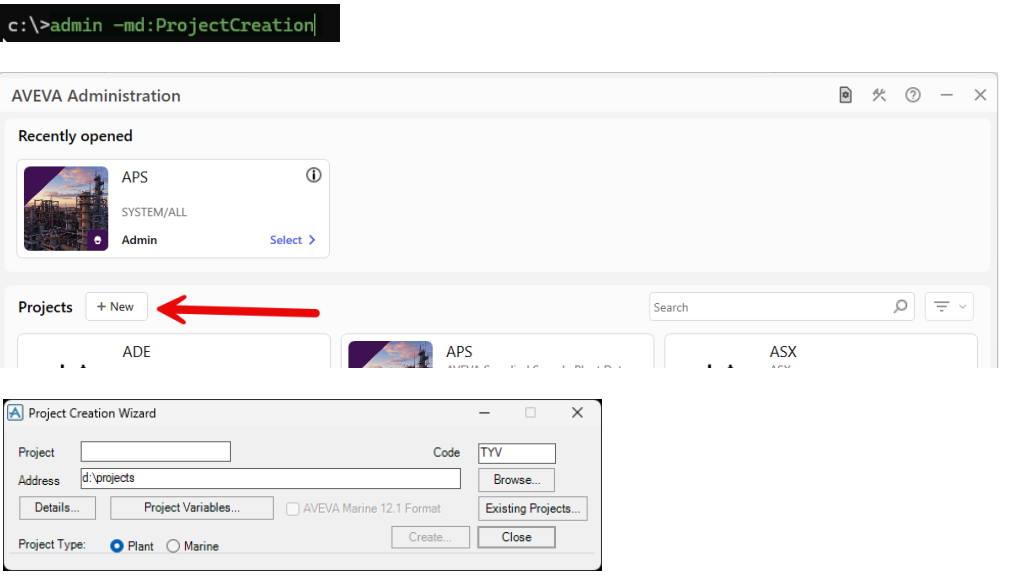
New projects can be made interactively using the project creation wizard, available in the log in form for Administration as shown below. Or the Project Creation Wizard can be summoned from a command line using this syntax.
This page summarizes key improvements from the official AVEVA release notes. For full details, please refer to AVEVA’s official documentation.